> ## Documentation Index
> Fetch the complete documentation index at: https://help.ratemyflat.co.nz/llms.txt
> Use this file to discover all available pages before exploring further.
# Writing a review
> How to share your rental experience anonymously and help the next tenant.
The rental market doesn't have a memory. Once tenants move out, what they learned about the home — the cold spots, the slow repairs, the great natural light — leaves with them. Reviews on ratemyflat are how that knowledge stays with the home, anonymously, for the next person searching.
## Who can write a review?
Anyone with a ratemyflat account who has lived in the home can write a review. You don't need to be the current tenant — past tenants count too, and your review still helps.
## The review process
The review flow is quick but thorough. You'll work through sections one at a time — each unlocks once the previous is complete.
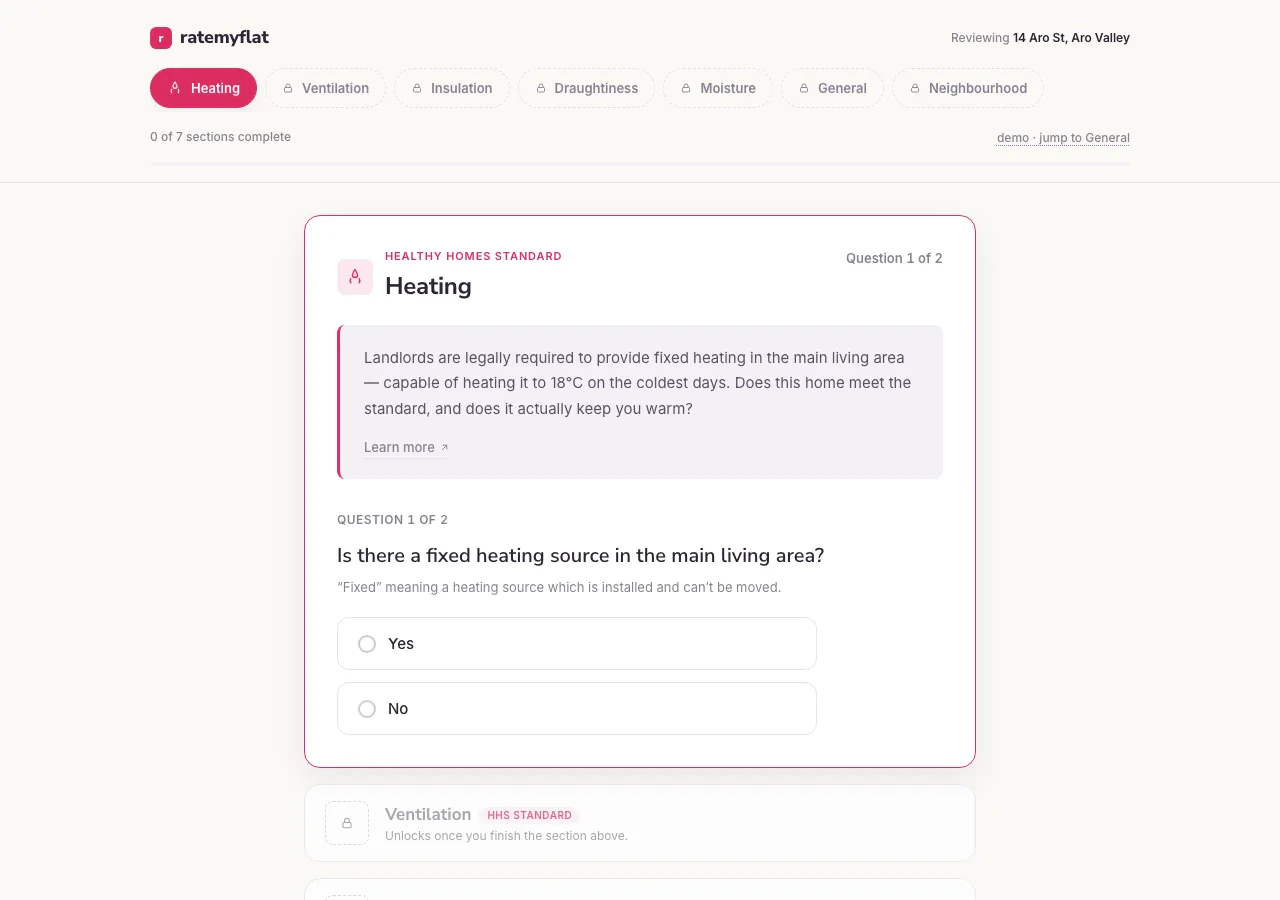 You'll be asked about seven domains:
1. **Heating:** Is there fixed heating in the main living area, and does it actually keep the home warm in winter?
2. **Ventilation:** Working extractor fans in the kitchen and bathrooms, and openable windows in every habitable room.
3. **Insulation:** Ceiling, underfloor, and wall coverage — and how complete it is.
4. **Draughtiness:** Draughts under doors, gaps around windows, curtains moving when it's windy.
5. **Moisture:** Visible mould, condensation on the windows, and whether gutters and drains cope with heavy rain.
6. **General:** Day-to-day life in the home — soundproofing, water pressure, how the manager responds when something breaks, and your overall recommendation.
7. **Neighbourhood:** Noise, safety, and anything else worth knowing about the area.
Search for the home by address and click "Rate a home" or "Add a review".
Work through each of the seven domains. The more specific you are, the more useful the review.
Submit your review. You'll then have the option to verify your tenancy, which gives your review more weight in the home's score.
**What makes a useful review?**
Specific examples beat vague statements. "The property manager took three weeks to respond to a leaking tap" tells the next tenant more than "the property manager was bad."
## Anonymity and privacy
Reviews are always anonymous. Your name, email, and exact tenancy dates are never shown alongside your review — landlords and property managers see what the public sees. We collect your details only to verify you actually lived at the home.
## Editing or withdrawing a review
If your circumstances change or you realise you made a mistake, you can manage your reviews from **My Homes**.
* **Editing:** Update the text or ratings of your review at any time.
* **Withdrawing:** Open the home in My Homes and choose to archive or delete the review.
Sign up to contribute reviews and verify the homes you've lived in. Reviews are anonymous and free.
You'll be asked about seven domains:
1. **Heating:** Is there fixed heating in the main living area, and does it actually keep the home warm in winter?
2. **Ventilation:** Working extractor fans in the kitchen and bathrooms, and openable windows in every habitable room.
3. **Insulation:** Ceiling, underfloor, and wall coverage — and how complete it is.
4. **Draughtiness:** Draughts under doors, gaps around windows, curtains moving when it's windy.
5. **Moisture:** Visible mould, condensation on the windows, and whether gutters and drains cope with heavy rain.
6. **General:** Day-to-day life in the home — soundproofing, water pressure, how the manager responds when something breaks, and your overall recommendation.
7. **Neighbourhood:** Noise, safety, and anything else worth knowing about the area.
Search for the home by address and click "Rate a home" or "Add a review".
Work through each of the seven domains. The more specific you are, the more useful the review.
Submit your review. You'll then have the option to verify your tenancy, which gives your review more weight in the home's score.
**What makes a useful review?**
Specific examples beat vague statements. "The property manager took three weeks to respond to a leaking tap" tells the next tenant more than "the property manager was bad."
## Anonymity and privacy
Reviews are always anonymous. Your name, email, and exact tenancy dates are never shown alongside your review — landlords and property managers see what the public sees. We collect your details only to verify you actually lived at the home.
## Editing or withdrawing a review
If your circumstances change or you realise you made a mistake, you can manage your reviews from **My Homes**.
* **Editing:** Update the text or ratings of your review at any time.
* **Withdrawing:** Open the home in My Homes and choose to archive or delete the review.
Sign up to contribute reviews and verify the homes you've lived in. Reviews are anonymous and free.